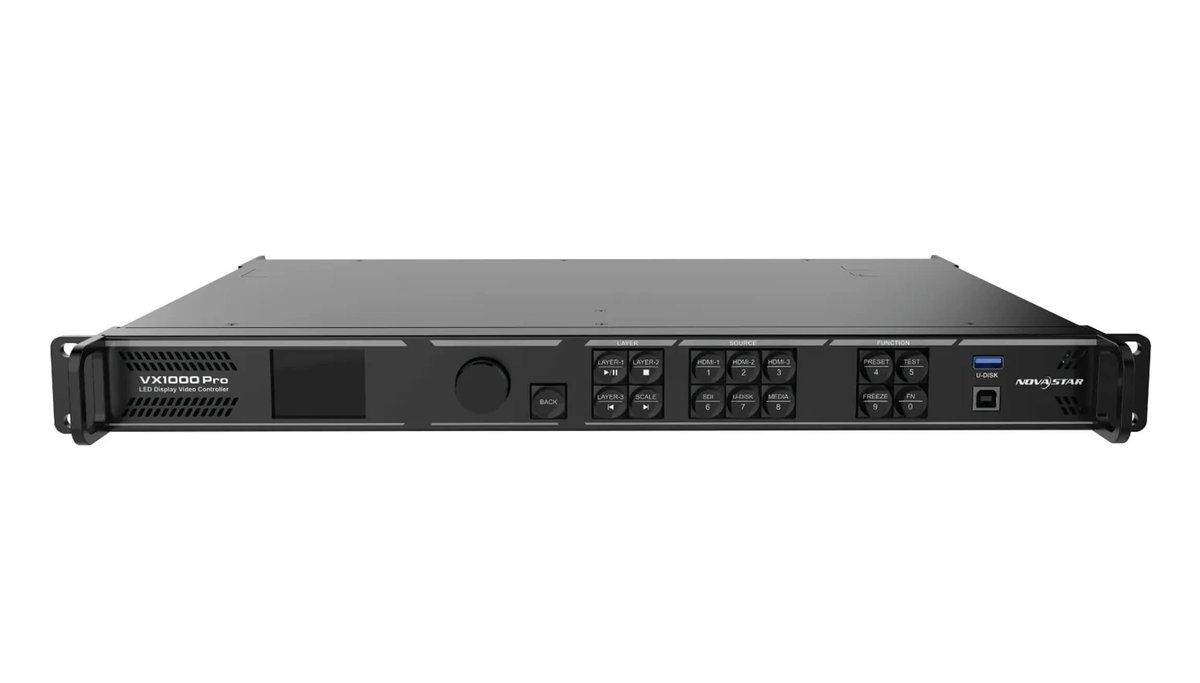
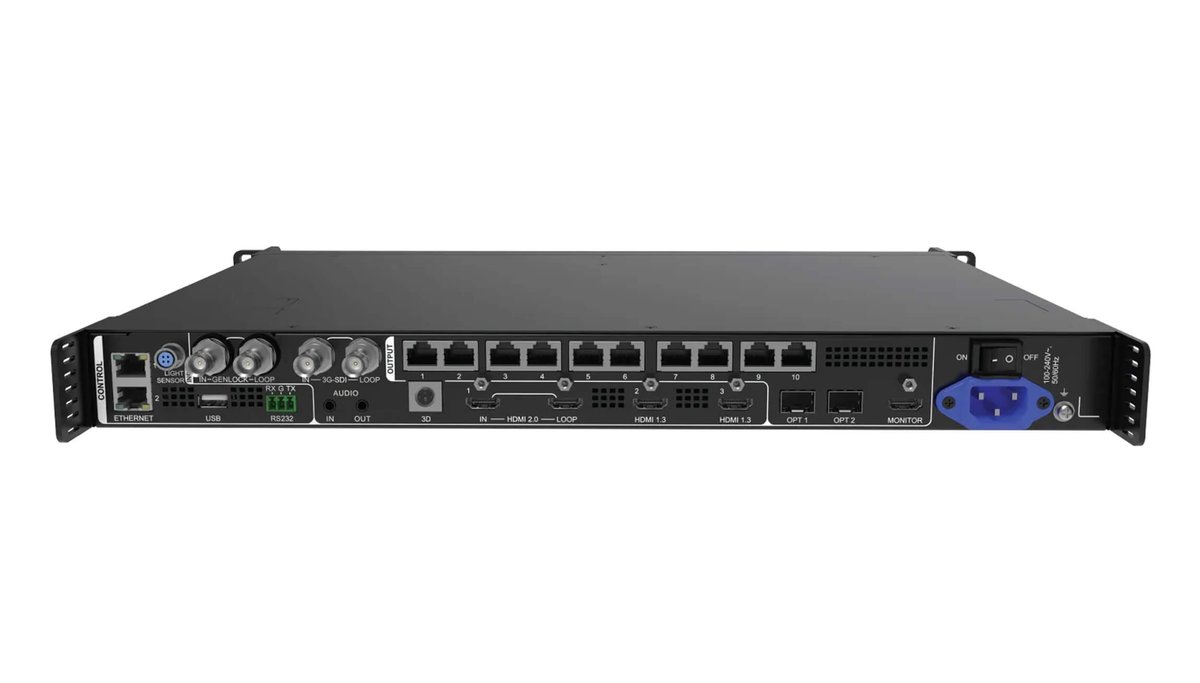
Description
NovaStar VX1000 Pro: Quick Answer
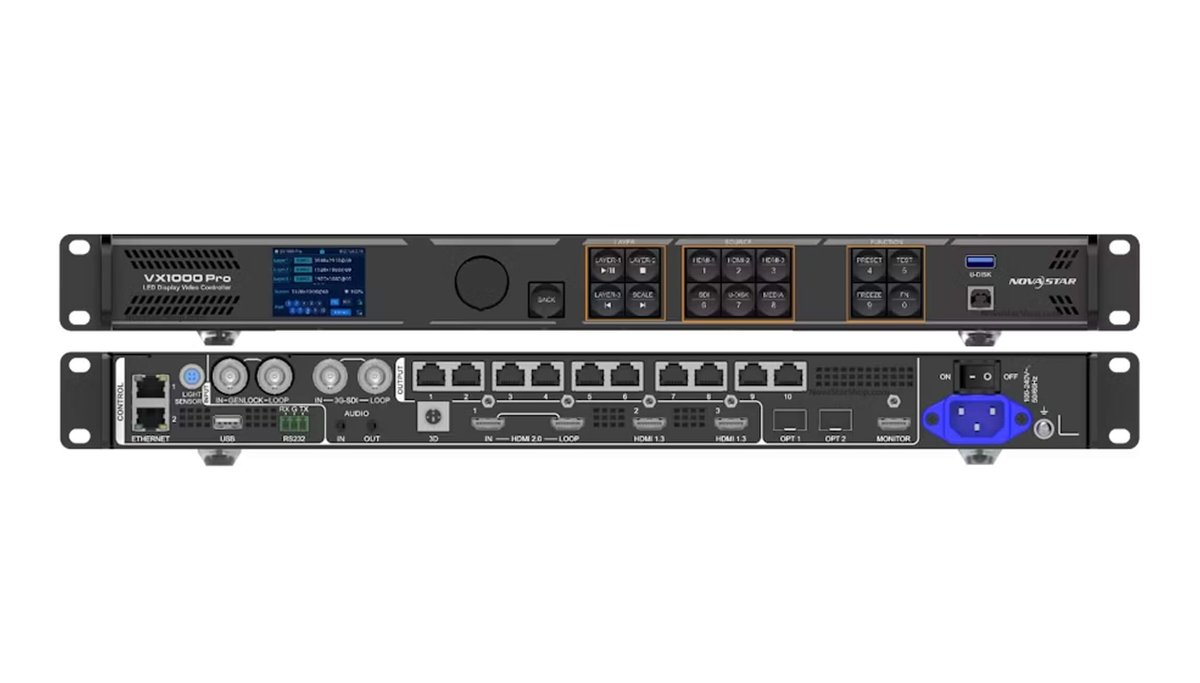
The NovaStar VX1000 Pro is an all-in-one 4K60 LED video controller and processor for rental, stage, broadcast and fine-pitch LED displays. It provides 10 Gigabit Ethernet outputs, controls up to 6.5 million pixels and supports a maximum canvas of 10,240 × 8,192 pixels. NovaStar’s V1.2.0 specifications list one HDMI 2.0 input with loop, two HDMI 1.3 inputs, one 3G-SDI input with loop, one self-adaptive 10G optical port and USB 3.0 media playback.
The VX1000 Pro also provides six 2K layer resources, up to 256 presets and three working modes: Video Controller, Fiber Converter and ByPass. ByPass with low latency enabled can reduce device delay to 0 frames. Use the specifications and comparisons below to confirm whether its input mix, output capacity and fiber workflow fit your LED display system.
NovaStar VX1000 Pro Key Specifications
| Product type | All-in-one LED video controller and processor |
|---|---|
| LED loading capacity | Up to 6.5 million pixels |
| Maximum canvas | 10,240 pixels wide or 8,192 pixels high, within the total loading capacity |
| Video and media inputs | 1 × HDMI 2.0 (IN & LOOP), 2 × HDMI 1.3, 1 × 3G-SDI (IN & LOOP), 1 × self-adaptive OPT 1 and 1 × USB 3.0 media port |
| LED and auxiliary outputs | 10 × Gigabit Ethernet, 2 × 10G optical ports, 1 × HDMI 1.3 monitoring output and 1 × 3D connector |
| Maximum HDMI 2.0 input | 4096 × 2160 at 60Hz |
| Layers and presets | 6 × 2K layer resources and up to 256 user-defined presets |
| Latency | Video Controller: 1-2 frames with low latency; ByPass: 0 frames with low latency; Fiber Converter: 0 frames |
| Audio | Audio embedded with HDMI plus independent 3.5 mm audio input and output, with output volume control |
| Control options | Front-panel controls, NovaLCT, Unico client or web interface, VICP app and optional remote control |
| Rated power | 44 W |
Video Inputs, LED Outputs and Audio
Input connections
- HDMI 2.0: One input with loop output, up to 4096 × 2160 at 60Hz. It supports compatible HDMI 1.4/1.3 signals, 8-bit, 10-bit and 12-bit input, HDCP 1.4/2.2 and accompanied audio. Up to six devices can be connected in one HDMI loop.
- HDMI 1.3: Two inputs, each supporting up to 1920 × 1080 at 60Hz and 8-bit video input.
- 3G-SDI: One input with loop output, deinterlacing and up to 1920 × 1080 at 60Hz. The connector supports 10-bit video input.
- OPT 1: One self-adaptive 10G optical connection that can operate as a video input or as a sending-card output, depending on the connected equipment.
- USB 3.0: Plays compatible images and videos from a USB drive. A separate USB 2.0 control connector is used for device cascading, firmware work, logs and EDID files.
Outputs and monitoring
- 10 Gigabit Ethernet ports: Up to 650,000 pixels per port at 8-bit output, subject to the 6.5-million-pixel device limit.
- Two 10G optical ports: OPT 1 can send the output of Ethernet ports 1-10; OPT 2 can copy, back up or loop that signal.
- HDMI monitoring: One HDMI 1.3 output provides a fixed 1920 × 1080 at 60Hz monitor feed.
- Audio: One 3.5 mm audio input and one 3.5 mm audio output support sampling rates up to 48 kHz. HDMI sources can also carry accompanied audio.
- 3D: One dedicated connector accepts a compatible third-party 3D emitter. When Side-by-Side or Top-and-Bottom 3D is enabled, the LED output capacity is halved.
Layers, Presets, Latency and Backup
The VX1000 Pro offers six 2K × 1K layer resources. A 4K × 2K layer consumes four resources, a 4K × 1K layer consumes two and a 2K × 1K layer consumes one. Layer size, position, priority and aspect ratio are adjustable. Up to 256 presets can store and recall tested layouts.
| Working mode | Low latency enabled | Low latency disabled |
|---|---|---|
| Video Controller | 1-2 frames | 2-3 frames |
| ByPass | 0 frames | 1 frame |
| Fiber Converter | 0 frames | 0 frames |
Low-latency operation has configuration limits: cabinets loaded by the Ethernet ports must align at the top of the screen’s circumscribed rectangle. ByPass mode provides direct signal routing and does not provide the independent video-processing functions available in Video Controller mode. In ByPass mode, low latency and Genlock cannot be enabled at the same time.
For live-event resilience, the controller supports backup between devices, input sources, Ethernet ports, OPT and Ethernet paths, plus dual receiving-card backup. It can test stored backup paths without repeatedly disconnecting Ethernet cables, and it restores saved settings after a normal shutdown or unexpected power loss.
Fiber Distance and Optical Module Requirements
The two optical ports support three practical paths: OPT 1 input with OPT 2 output backup/copy, OPT 1 input with OPT 2 loop output, or OPT 1 output with OPT 2 backup/copy. With the matching twin-core optical modules, NovaStar specifies transmission distances of up to 10 km for single-mode and up to 300 m for multi-mode.
The optical modules are not installed at the factory. Confirm the required single-mode or multi-mode modules, LC fiber type, link distance and backup topology before ordering.
USB Playback and Control Software
USB playback accepts JPG, JPEG, PNG and BMP images, plus common video containers including MP4, MKV, MOV, AVI, FLV, M4V, MPG, MPEG and TS. H.265 playback can reach 3840 × 2160 at 60fps; H.264 can reach 3840 × 2160 at 30fps. The internal USB source is fixed at 1920 × 1080 at 60Hz for processing.
Configuration and operation are available through the front panel, NovaLCT, the Unico client or browser interface and the VICP mobile app. The optional handheld remote can handle standby, screen power, brightness, volume, preset selection, USB playback, image quality, layer sources and 3D controls. Confirm the recommended firmware and software versions for the complete receiving-card system before deployment.
NovaStar VX1000 Pro vs VX1000
The classic NovaStar VX1000 and VX1000 Pro both provide 10 Gigabit Ethernet outputs, a 6.5-million-pixel capacity and a 10,240 × 8,192 maximum canvas. The Pro model is the better fit when the workflow needs native HDMI 2.0 4K60, more layers, many more presets, independent audio I/O or USB media playback.
| Specification | VX1000 Pro | Classic VX1000 |
|---|---|---|
| Loading capacity | 6.5 million pixels; 10 Ethernet outputs | 6.5 million pixels; 10 Ethernet outputs |
| Maximum canvas | 10,240 × 8,192 pixels | 10,240 × 8,192 pixels |
| Main video inputs | 1 × HDMI 2.0 with loop, 2 × HDMI 1.3, 1 × 3G-SDI with loop and self-adaptive OPT 1 | 2 × HDMI 1.4, 2 × DVI, 1 × 3G-SDI with loop and self-adaptive OPT 1 |
| Maximum direct input | 4096 × 2160 at 60Hz through HDMI 2.0 | 3840 × 1080 at 60Hz or 3840 × 2160 at 30Hz through HDMI 1.4/DVI |
| Layers | 6 × 2K layer resources | 3 layers |
| Presets | Up to 256 | Up to 10 |
| Low latency | 0 frames in ByPass; 1-2 frames in Video Controller mode | Down to 20 lines when low latency and Bypass are enabled |
| USB media playback | Yes, through USB 3.0 | No USB media playback listed; USB 2.0 is for control and cascading |
| Independent audio | 3.5 mm audio input and output | HDMI input audio; output through a multifunction card |
| Control platforms | NovaLCT, Unico and VICP | NovaLCT and V-Can |
VX Pro Series Comparison
Choose a VX Pro model from the required total pixel count and Ethernet-port map first, then confirm the input connector mix. The VX400 Pro, VX600 Pro and VX1000 Pro share the same core input family and six 2K layer resources; the VX2000 Pro doubles the VX1000 Pro loading tier and adds a broader input set.
| Model | Loading capacity | Ethernet / OPT outputs | Maximum canvas | Layer resources | Main inputs |
|---|---|---|---|---|---|
| VX400 Pro | 2.6 million pixels | 4 / 2 | 10,240 × 8,192 pixels | 6 × 2K | HDMI 2.0 loop, 2 × HDMI 1.3, 3G-SDI loop, 10G OPT, USB 3.0 |
| VX600 Pro | 3.9 million pixels | 6 / 2 | 10,240 × 8,192 pixels | 6 × 2K | HDMI 2.0 loop, 2 × HDMI 1.3, 3G-SDI loop, 10G OPT, USB 3.0 |
| VX1000 Pro | 6.5 million pixels | 10 / 2 | 10,240 × 8,192 pixels | 6 × 2K | HDMI 2.0 loop, 2 × HDMI 1.3, 3G-SDI loop, 10G OPT, USB 3.0 |
| VX2000 Pro | 13 million pixels | 20 / 4 | 16,384 × 8,192 pixels | 12 × 2K | DP 1.2, 2 × HDMI 2.0, 4 × HDMI 1.3, 12G-SDI loop, 2 × 10G OPT, USB 3.0 |
Physical Specifications and Included Accessories
| Power input | 100-240V~, 50/60Hz, 2A-0.8A |
|---|---|
| Rated power consumption | 44 W |
| Operating temperature | 0°C to 50°C |
| Dimensions | 482.6 × 302.2 × 50.1 mm |
| Net weight | 3.9 kg |
| Typical noise level | 45 dB(A) at 25°C |
| Standard accessories | Power cord, Ethernet cable, HDMI cable, two silicone dustproof plugs, USB cable, Phoenix connector, Quick Start Guide, Certificate of Approval and Safety Manual |
| Optional accessory | Handheld remote control, NovaStar item code M07020005 |
Recommended Uses and Buying Checklist
The VX1000 Pro is suited to medium- and high-end rental systems, concert and touring screens, stage-control systems, broadcast and virtual-production displays, control rooms, corporate events, fine-pitch LED walls and ultra-wide canvases that remain inside its loading limits.
- Calculate the total pixels and per-port load from the cabinet resolution and receiving-card map.
- Confirm that HDMI 2.0, HDMI 1.3, 3G-SDI, OPT and USB sources match the planned signal workflow.
- Select the correct optical modules and fiber because optical modules are not factory-installed.
- Check whether 3D, Genlock, low latency, backup or free-topology restrictions affect the screen design.
- Confirm the current firmware, NovaLCT/Unico compatibility, optional remote and required cables before shipment.
Need a project quote? Request the current VX1000 Pro price, confirm stock and send your LED screen configuration to . Include the total pixel count, cabinet resolution, receiving-card model, source formats and required fiber distance for a useful compatibility check.
NovaStar VX1000 Pro FAQ
How many pixels can the NovaStar VX1000 Pro control?
The NovaStar VX1000 Pro controls up to 6.5 million pixels through 10 Gigabit Ethernet outputs. Its maximum canvas width is 10,240 pixels and its maximum height is 8,192 pixels, subject to the total loading capacity and receiving-card map.
Which video and audio connections does the VX1000 Pro have?
The VX1000 Pro has one HDMI 2.0 input with loop, two HDMI 1.3 inputs, one 3G-SDI input with loop, one self-adaptive OPT 1 connection and a USB 3.0 media port. It also provides a 3.5 mm audio input and output, accompanied HDMI audio and an HDMI 1.3 monitoring output.
Does the NovaStar VX1000 Pro support 4K at 60Hz?
Yes. Its HDMI 2.0 input supports up to 4096 × 2160 at 60Hz. The controller supports 8-bit, 10-bit and 12-bit HDMI 2.0 input, but available frame rates vary with resolution, bit depth and color sampling.
What is the difference between the VX1000 Pro and VX1000?
Both models control up to 6.5 million pixels through 10 Ethernet outputs. The VX1000 Pro adds HDMI 2.0 4K60, six 2K layer resources, 256 presets, USB 3.0 media playback, independent 3.5 mm audio input and output, and the current Unico/VICP control workflow; the classic VX1000 uses HDMI 1.4 and DVI, provides three layers and stores up to 10 presets.
Which software and USB media formats work with the VX1000 Pro?
The controller works with NovaLCT, the Unico client or web interface and the VICP app. USB playback supports JPG, JPEG, PNG and BMP images plus MP4, MKV, MOV, AVI, FLV, M4V, MPG, MPEG and TS video containers with the supported codecs and limits listed in the official specifications.
Where can I get the current VX1000 Pro price and datasheet?
uses inquiry pricing for this product, so request the current price and confirm stock before ordering. The current manufacturer reference used on this page is NovaStar VX1000 Pro All-in-One Controller Specifications V1.2.0, released September 30, 2025.
Downloads and Official Sources
- NovaStar VX1000 Pro All-in-One Controller Specifications V1.2.0 – primary source, released September 30, 2025.
- NovaStar Solutions Brochure 2026 – source for the VX Pro family comparison.
- Archived site copy: VX1000 Pro Specifications V1.0.1 – retained for historical reference; use V1.2.0 for current specifications.
Classic VX1000 comparison values were checked against NovaStar VX1000 All-in-One Controller Specifications V1.5.0, released November 9, 2023. Specifications, firmware support and included accessories can change with production revisions. Confirm the current project requirements before ordering.
{
“@context”: “https://schema.org”,
“@type”: “FAQPage”,
“@id”: “https://.com/product/novastar-vx1000-pro-all-in-one-video-controller/#faq”,
“mainEntity”: [
{
“@type”: “Question”,
“name”: “How many pixels can the NovaStar VX1000 Pro control?”,
“acceptedAnswer”: {
“@type”: “Answer”,
“text”: “The NovaStar VX1000 Pro controls up to 6.5 million pixels through 10 Gigabit Ethernet outputs. Its maximum canvas width is 10,240 pixels and its maximum height is 8,192 pixels, subject to the total loading capacity and receiving-card map.”
}
},
{
“@type”: “Question”,
“name”: “Which video and audio connections does the VX1000 Pro have?”,
“acceptedAnswer”: {
“@type”: “Answer”,
“text”: “The VX1000 Pro has one HDMI 2.0 input with loop, two HDMI 1.3 inputs, one 3G-SDI input with loop, one self-adaptive OPT 1 connection and a USB 3.0 media port. It also provides a 3.5 mm audio input and output, accompanied HDMI audio and an HDMI 1.3 monitoring output.”
}
},
{
“@type”: “Question”,
“name”: “Does the NovaStar VX1000 Pro support 4K at 60Hz?”,
“acceptedAnswer”: {
“@type”: “Answer”,
“text”: “Yes. Its HDMI 2.0 input supports up to 4096 u00d7 2160 at 60Hz. The controller supports 8-bit, 10-bit and 12-bit HDMI 2.0 input, but available frame rates vary with resolution, bit depth and color sampling.”
}
},
{
“@type”: “Question”,
“name”: “What is the difference between the VX1000 Pro and VX1000?”,
“acceptedAnswer”: {
“@type”: “Answer”,
“text”: “Both models control up to 6.5 million pixels through 10 Ethernet outputs. The VX1000 Pro adds HDMI 2.0 4K60, six 2K layer resources, 256 presets, USB 3.0 media playback, independent 3.5 mm audio input and output, and the current Unico/VICP control workflow; the classic VX1000 uses HDMI 1.4 and DVI, provides three layers and stores up to 10 presets.”
}
},
{
“@type”: “Question”,
“name”: “Which software and USB media formats work with the VX1000 Pro?”,
“acceptedAnswer”: {
“@type”: “Answer”,
“text”: “The controller works with NovaLCT, the Unico client or web interface and the VICP app. USB playback supports JPG, JPEG, PNG and BMP images plus MP4, MKV, MOV, AVI, FLV, M4V, MPG, MPEG and TS video containers with the supported codecs and limits listed in the official specifications.”
}
},
{
“@type”: “Question”,
“name”: “Where can I get the current VX1000 Pro price and datasheet?”,
“acceptedAnswer”: {
“@type”: “Answer”,
“text”: “ uses inquiry pricing for this product, so request the current price and confirm stock before ordering. The current manufacturer reference used on this page is NovaStar VX1000 Pro All-in-One Controller Specifications V1.2.0, released September 30, 2025.”
}
}
]
}